
Power Switch: Futaba 12FGA 12-Channel 2.4 GHz/ R6014FS Receiver Mode 2
Bob Aberle
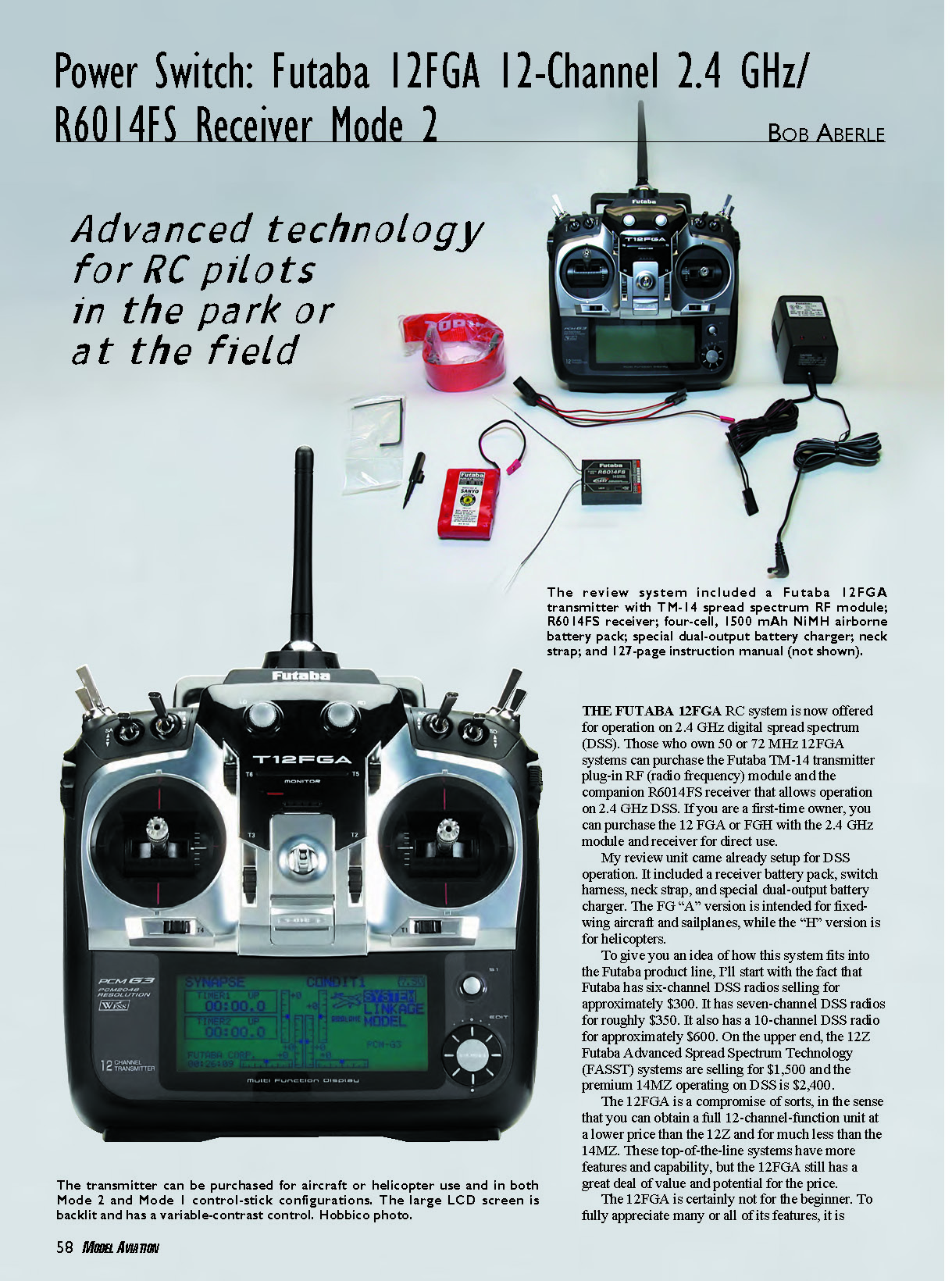
THE FUTABA 12FGA RC system is now offered for operation on 2.4 GHz digital spread spectrum (DSS). Those who own 50 or 72 MHz 12FGA systems can purchase the Futaba TM-14 transmitter plug-in RF (radio frequency) module and the companion R6014FS receiver that allows operation on 2.4 GHz DSS. If you are a first-time owner, you can purchase the 12FGA or FGH with the 2.4 GHz module and receiver for direct use.
My review unit came already setup for DSS operation. It included a receiver battery pack, switch harness, neck strap, and special dual-output battery charger. The FG “A” version is intended for fixed-wing aircraft and sailplanes, while the “H” version is for helicopters.
To give you an idea of how this system fits into the Futaba product line, I’ll start with the fact that Futaba has six-channel DSS radios selling for approximately $300. It has seven-channel DSS radios for roughly $350. It also has a 10-channel DSS radio for approximately $600. On the upper end, the 12Z Futaba Advanced Spread Spectrum Technology (FASST) systems are selling for $1,500 and the premium 14MZ operating on DSS is $2,400.
The 12FGA is a compromise of sorts, in the sense that you can obtain a full 12-channel function unit at a lower price than the 12Z and for much less than the 14MZ. These top-of-the-line systems have more features and capability, but the 12FGA still has a great deal of value and potential for the price.
The 12FGA is certainly not for the beginner. To fully appreciate many or all of its features, it is intended that you be an experienced modeler and active competition flier.
Because of this unit's complexity, you should start by reviewing the 127-page instruction booklet. Hobbico was thoughtful enough to make the manual available on its Web site. (See the source listing for the address.)
If all of this system's features and operational aspects appeal to you, you have made the right choice. If you never expect to get to use more than five-channel control as a sport flier, you would be wise to look at the Futaba six- and seven-channel DSS systems.
Following is an overview of this 12-channel guidance tool's system, operation, and some of the control features that will prove to be especially interesting. I promise I won't supply you with a copied catalog or brochure information. Go to the manual for that!
If you already own a 12FG system operating on 50 or 72 MHz and then you purchase the TM-14 transmitter module and the R6014FS receiver, you must upgrade the software in your transmitter. This can be done with a free software download from Futaba.
You can download the software from your PC to a standard SD memory card, which is then plugged into a socket inside the transmitter's battery compartment. If you bought your 12FG with the 2.4 GHz transmitter module and receiver, the updating has already been done.
Right: The author points to the battery cable that must be plugged back into the connector inside the battery compartment before charging can begin.
Left: The antenna on the TM-14 module is only 4 inches long. You can also see the charging jack and the DSC/trainer-cord jack, both of which are located on the rear of the transmitter case.
Right: The SD card is plugged into the socket located inside the battery compartment. This is a standard memory card (not supplied) that can be purchased in any electronics store. Hobbico photo.
When you first go to charge your transmitter's battery pack, you may be in for a surprise unless you read the note on the front page of the instruction manual. It tells you that the transmitter has been shipped with the battery pack unplugged.
You must open the battery compartment and plug in the battery connector. After you do that, charging can proceed as normal.
The transmitter comes with an unusual battery configuration. It is a NiMH pack consisting of only six cells (7.2 volts), but at a higher-than-usual capacity of 1700 mAh.
The four-cell receiver pack consists of 1500 mAh-capacity cells. The supplied dual-output charger has been specially selected to charge these particular cells properly. Do not attempt to substitute a standard wall-plug charger, or the batteries will not be charged properly.
Each RC manufacturer employs its own proprietary DSS technology. Futaba calls its system "FASST," or Futaba Advanced Spread Spectrum Technology.
The Futaba DSS technique operates similarly to our cell phones. The system jumps from channel to channel, constantly seeking clear channels. It calls this technique "frequency hopping."
The beauty of this particular DSS operation is that you will get no interference from other manufacturers' equipment, and you won't even be interfered with by other Futaba FASST systems. In effect, the time-honored frequency-control boards we use at local flying field are no longer required for DSS operation (although it is not advised to discard them). In addition, nearby flying fields are no longer hazards to sanctioned AMA flying sites when using DSS technology. (Existing RC systems on 27, 50, and 72 MHz still require frequency-control management.)
As many have already learned, DSS operation requires a new technique called "binding," or "linking," which means that you must set your new receiver to accept the special digital code imbedded in your transmitter at the time of manufacture. Once this is done, the two units will be "locked on," and no one else can operate or interfere with your system.
The linking technique for this Futaba system is simple and takes only a minute or so. But when you buy the 12FG system with the TM-14 transmitter RF module and the R6014FS receiver, the initial linking has already been done at the factory.
Another technique that is different with DSS is range testing. Since you can't collapse a transmitter antenna that measures only 4 inches, you must resort to electronically reducing the signal strength. This is also easy to do and takes only a few minutes. If your receiver/servos operate at 30-50 paces from the transmitter during the range-check mode, you will have full radio range.
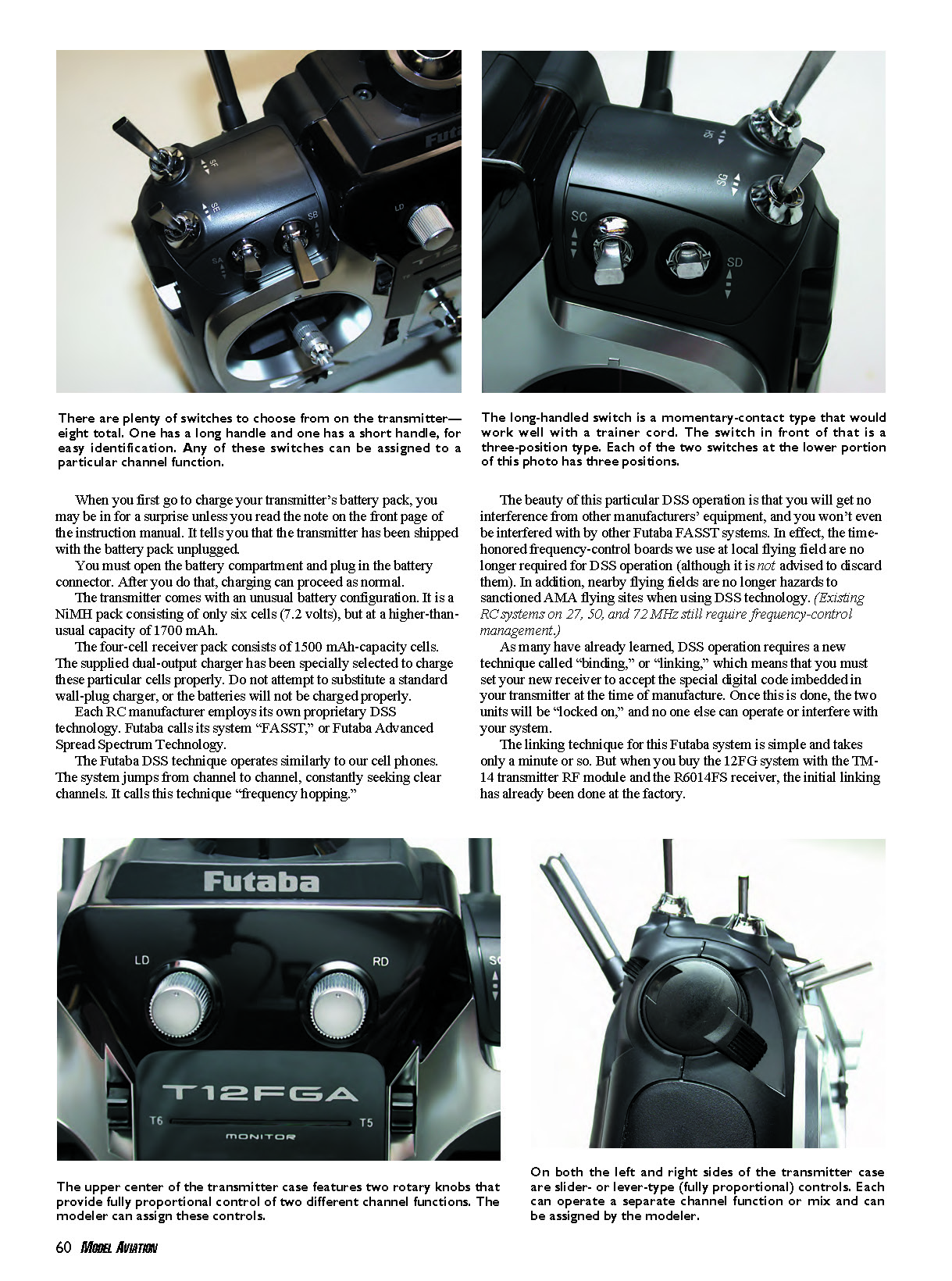
The Futaba R6014FS receiver actually has 14-channel capability, but only 12 channels are required for this particular system. The receiver weighs 0.7 ounce, so it can easily fit into an average-size park flyer.
Exiting the case are two antennas, each measuring slightly less than 5 inches in length. The Futaba dual-diversity antenna system selects the best reception between the two receiver antennas so that you will experience no signal loss.
You must carefully orient the two antennas inside your aircraft so they are at right angles (90°) to one another. Additional R6014FS receivers cost $200 each.
The 12FGA System: Although each transmitter is programmed for aircraft/sailplanes and helicopters, separate ordering is required for both types. You can also order either Mode 2 or Mode 1 control-stick configurations.
The transmitter can store up to 30 models in its memory, and each can be named. Additional memory and copying between transmitters can be accomplished by using a standard SD memory card (which is not supplied).
Futaba G3 2048 resolution technology is offered for precise control, especially when using digital servos. Digital trims are available on six channel functions (not just the usual four). Programmable failsafe is included.
Twenty-seven built-in mixer functions are provided, all of which are detailed in the 127-page instruction manual. Programmable can be accomplished by using a standard SD memory card (which is not supplied).
Pluses and Minuses
+ Advanced radio system at a competitive price. + All switches and levers are assignable according to pilot's choice. + Ergonomic transmitter case design with rubber grips. + Updatable, and programming can be saved to a PC. + Optional transmitter module makes this radio 72 MHz compatible.
- Would be more user-friendly with a quick-start guide.
Mixing is available to suit your personal flying needs. Two timer functions are available. Variable dual rates are offered along with the more standard exponential rates, endpoint adjustments, and servo reversing.
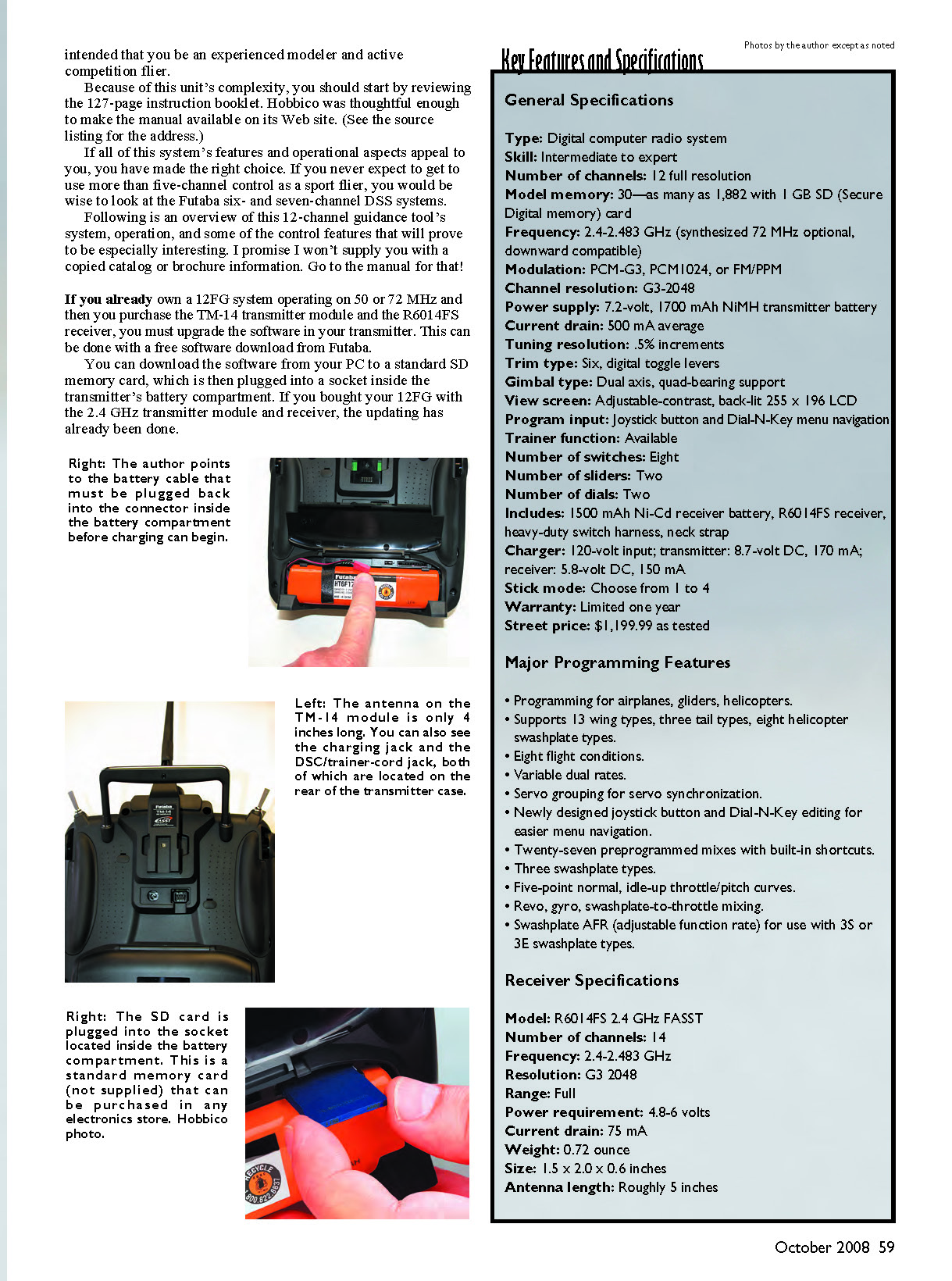
A large (3 3/4 x 1 1/2 inches) back-lit LCD screen displays the entire menu and control input information. Menu selection and control settings are input with a rotary (scroll) EDIT dial and a push-button EDIT switch located just to the right of the LCD screen. This control can be locked out, if you want, to prevent unwanted commands from being entered during flight.
The transmitter provides up to 12 channel functions. The four basic flight controls operate from two dual-axis control-stick assemblies.
In addition, two channels are operated by rotary dials located in the upper center portion of the transmitter. These knobs provide full proportional control. There are two levers on opposite sides of the transmitter case, which also provide full proportional control. As you pass through the neutral or midrange control position with the rotary and lever controls, you will hear a beep.
There are eight control switches. One is a momentary contact, two-position type, such as for trainer operation. Four switches have short handles and provide three discrete control positions. Two switches have long handles, providing three control positions. Then one long-handled switch has two positions.
There are more switches, levers, and knobs than there are channel functions. The choice and assignment of those implements will be up to you.
You might ask why 12 channel functions would ever be needed. The instruction manual shows some brilliant control setups that, in some cases, include eight servos in a wing that provide brake flaps, camber flaps, main ailerons, and chip ailerons. Other special control features are available for advanced 3-D-type flying.
I suggest that Futaba provide some sort of "quick start" guide to help the first-time user get started. There is so much in the manual that it is initially overwhelming.
When I tried some basic channel functions, I found that above channel 6 (such as 7-12), I couldn't get a servo to operate. I learned that you must assign the various switches, levers, and knobs to get these controls to operate. With that in mind, I have a few start-up suggestions that will save you a lot of time.
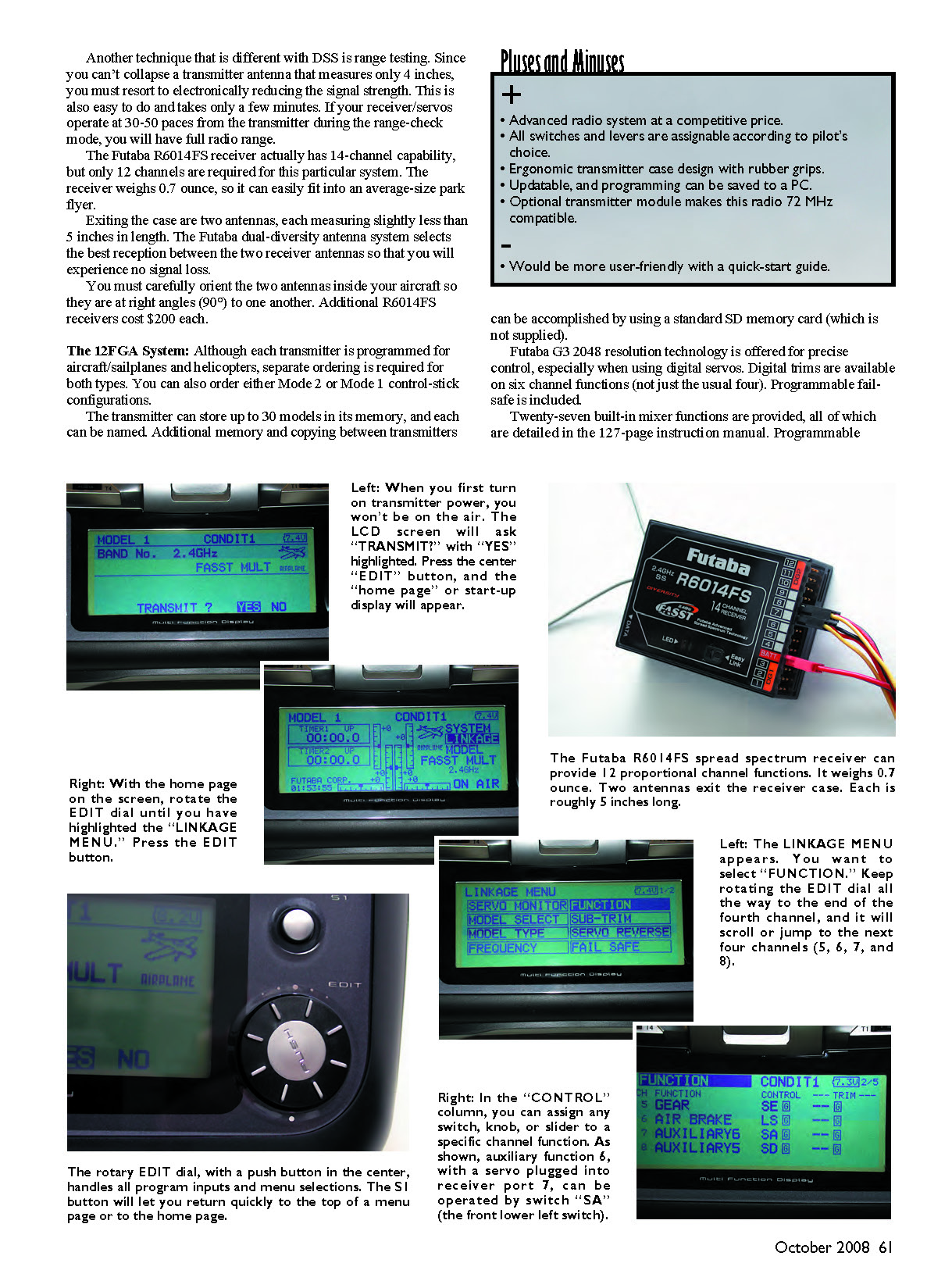
First, turn on the transmitter's power. The LCD screen will read, "TRANSMIT? YES NO." With "YES" highlighted, press the EDIT button. Now you are "on the air" and broadcasting a signal, and the "SYSTEM" menu will be on the LCD screen. This is similar to your home page or start-up display.
Rotate the EDIT dial so that the "LINKAGE" menu is highlighted. Press the EDIT button and the LINKAGE menu appears.
Use the EDIT dial to highlight the word "FUNCTION," and press the EDIT button. At this point, the first four of the 12 channel functions will be displayed.
If you rotate the EDIT dial, you will scroll through these four channels and jump into the next four (channels 5, 6, 7, and 8). If you scroll down to Channel 7 ("AUXILIARY6") and highlight the box under the "CONTROL" column, a screen will appear that contains the reference numbers for all the switches, dials, and knobs.
You can select any of those tools, press the EDIT button, and that switch you selected will operate a servo plugged into your receiver's channel 7 port. Once you do this, you will get the entire idea.
You can assign almost any kind of control you want to suit your needs. You can program mix at your choice. You can even assign two channels to operate from a single switch. The possibilities are unlimited!
I've only touched the tip of the iceberg in this review. I do encourage you to visit the Web site that contains the full 127-page instruction manual. By doing so, you can determine whether or not this radio is for you.
As I mentioned, this system is definitely for the experienced RC flier. One transmitter of this caliber can easily satisfy all your RC flying needs. MA
Bob Aberle [email protected]
Manufacturer/Distributor: Futaba RC/Great Planes Hobby Distributors Box 9021, Champaign IL 61826 (217) 398-3630 http://2.4gigahertz.com/index.html
Sources: Futaba 12FG user manual http://manuals.hobbico.com/fut/12fg-manual.pdf
Other Printed Reviews: Fly RC: January 2008 Model Airplane News: October 2007
Transcribed from original scans by AI. Minor OCR errors may remain.

