


RADIO CONTROL HELICOPTERS
Ray Stacy 15 W. Main St., Webster, NY 14580 E-mail: [email protected]
Watt's Up — an onboard power meter
A really cool tool showed up in the mail this month. Paul Beard of Model Avionics (www.modelavionics.com) sent out the Watt's Up, which is advertised as an electronic onboard power meter for electric-powered RC helicopters. It was designed to help tune the battery system and motor. However, I have found other good uses for this device.
Some of the Watt's Up key features are as follows:
- Measures energy (watt-hours [Wh]), charge (ampere-hours [Ah]), power (watts [W]), current (amps [A]), and voltage (V).
- Has a connector to use a receiver battery for measurement down to 0 volts.
- Features low-battery-voltage detection with an optional LED for indication of low battery voltage while flying.
- Accurate and precise, with 0.01 A current and 0.01 V voltage resolutions.
- Measures current peaks and voltage minimums (droops).
- Rugged: handles 50 A continuous and 100 A peak at 60 V.
- Uses 14-gauge, 7 x 37 stranded, high-temperature silicone rubber insulated wire.
- Small and light: 2.8 inches long, 1.7 inches wide, and 0.83 inch thick; weighs 2.5 ounces.
- Acts like a wire so it doesn’t affect a model’s performance — a precision current-sensing resistor with only 0.001 ohm resistance and circuitry that draws only 0.007 A.
- Uses DSP to increase ADC resolution and differential measurement amplifiers to increase noise immunity.
- Factory calibration stores constants in EEPROM to compensate for component tolerances.
- Comes with a one-year warranty and a complete user’s manual.
- Made in the U.S. to ISO 9001:2000 quality standards.
What does all of this mean? I have always wanted an accurate way to determine not only how much battery power I use in a flight, but the maximum current draw during the flight. I think this is equally important because it gives a good indication of not only how well our servos are doing, but how hard we are working them. The Watt's Up does this beautifully.
The Watt's Up comes with bare wires, so the first thing you have to do is solder the appropriate connectors to the wires. I made a variety of adapters so that I can use the device in many different applications.
First test — Raptor 90SE
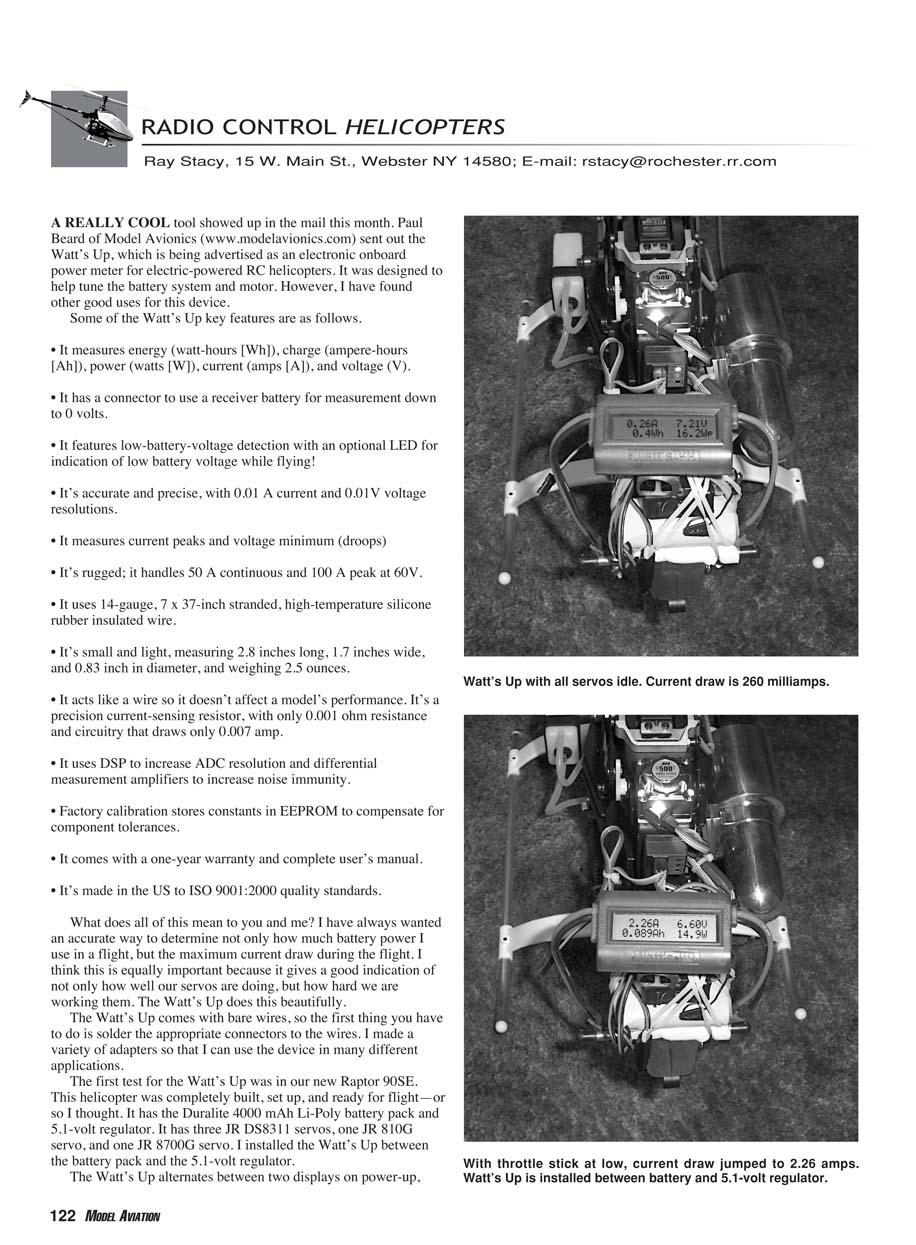
The first test for the Watt's Up was in our new Raptor 90SE. This helicopter was completely built, set up, and ready for flight—or so I thought. It has the Duralite 4000 mAh Li-Poly battery pack and a 5.1-volt regulator. It has three JR DS8311 servos, one JR 810G servo, and one JR 8700G servo. I installed the Watt's Up between the battery pack and the 5.1-volt regulator.
The Watt's Up alternates between two displays on power-up, showing peak amps, minimum volts, watts, and watt-hours, or amps, volts, watts, and ampere-hours. Even if you don’t purchase the Watt's Up, take a moment to download its instructions from the Model Avionics website — Paul Beard gives an excellent crash course on basic electronics and a great description of what the various terms mean and how they relate to our hobby.
Back to the Raptor. I found that in the idle state—mid-stick—the current draw was approximately 260 milliamps. That seems about right to me. Moving the sticks with no real load would draw roughly 1 amp. If I stalled one servo or tried to manually move a servo, I could get more than 2 amps!
Then I noticed something very strange. With nothing moving and the stick at the low position, I was drawing 2.26 amps. That’s not good. At mid-stick I was drawing 260 milliamps, and at low-stick I was drawing more than 2 amps. I popped the collective link off, and the current dropped to 740 milliamps. That was better but still not right. I had been stalling the collective servo at low stick. A couple turns of the collective link and the collective servo was much happier, but I still wasn’t at the 260 milliamps idle current that I had at mid-stick.
I popped off the throttle link, and the current draw was back to 260 milliamps. After a couple turns of the throttle link, all was well at all stick positions.
Remember that this is a helicopter that I had set up and thought was ready to fly. I do all of my initial mechanical setups by leaving off one end of the link and verifying that I am not creating a binding condition. This helicopter was no different. I had no visible or audible indication of a stalled servo, but the Watt's Up knew better. It earned its keep in the first 10 minutes of use.
In-flight test — Raptor 50
For the flight test I used my son Kyle’s Raptor 50. I installed the Watt's Up between the battery pack and the switch. Knowing that I could easily draw 2 amps by stalling a servo, the idea with the in-flight test was to see how much peak current could be drawn during a flight under actual flying loads. In other words, are we overloading our servos and wiring?
It took only a few minutes to install the Watt's Up. I used a couple of rubber bands to hold everything in place. Make sure you do a good job of soldering on the connectors — your helicopter’s life depends on it.
I turned the model over to Kyle. He proceeded to do a heavy 3-D flight that included many stick inputs and hard tail-rotor control. For a 12-minute flight we used approximately 600 milliamp-hours of battery power and, interestingly enough, the maximum current drawn during the flight was only 1.5 amps. Maybe that is only interesting to me, but I always thought we were drawing more current with our new high-tech, super-fast digital servos.
Judging from that data—assuming there is no binding—we are not pushing our servos, wiring, or switches past their design limitations. Yes, sometimes our equipment fails, but I do not believe it is because we asked for more than it could deliver.
For the next test, I will do the same thing on a couple of 90-size machines and my Bergen gasser. It will be just as interesting to see what current is being drawn in the larger machines. Stay tuned.
Watt's Up specifications
- Current: 0–100 A peak, 50 A continuous; resolution 0.01 A.
- Voltage: 0–60 V; resolution 0.01 V.
- Power: 0–6500 W; resolution 0.1 W.
- Charge: 0–65 Ah; resolution 0.001 Ah.
- Energy: 0–6500 Wh; resolution 0.1 Wh.
- Operates from 4.0 V to 60 V; 0 V with optional receiver battery pack.
- 16 x 2 STN LCD display screen.
- Powerful 8 MIPS microcontroller.
Other notes
By the time you read this, winter will have subsided here and the fleet that we worked on during the cold months will be getting a workout. I would like to think that it is time to put our micro electrics away for the season, but I am having way too much fun with the Trex from AlignRC. I bought mine from Wes Gray at www.modeofsheli.com. He is great to work with and responds quickly to all mail notes.
Once I saw that longtime helicopter friend Dave Darr had a Trex, I knew I had to get my order in. At $164 shipped, I simply couldn’t pass it up. The Trex is a baby Raptor that builds well, flies well, and is durable. Parts are also affordable.
The Trex’s 3-D performance is not quite equal to my Hornet 2, but Vinnie from JustGoFly.com has promised me a new brushless motor that should do the trick.
New on the bench for the glow machines are the Raptor 90SE and the Hirobo X-Spec. The Raptor 90 will be my first experience with an O.S.-C Spec engine. The X-Spec has a new YS 91 in it.
For all-out performance, my son and I prefer a 90-powered machine. The 50s are great and the gassers are nice, but they don’t yet compare to the rocking performance of a hot 90 running with a muscle pipe and 30% fuel. We are looking forward to giving both machines a good run and will report back about how well they are doing.
The Extreme Flight Championships (XFC) — the fourth annual Freestyle extravaganza — will be held June 10–12 in Troy, Ohio (www.xfc-rc.com). I have graciously been asked to judge and have accepted. Being a judge isn’t easy, but I will do my best.
Come on out and see the best 3-D pilots in the world. I hope to see you there!
Transcribed from original scans by AI. Minor OCR errors may remain.

